Brighten dark photos and fix color
Brighten a dark or dull photo in one click and balance its color. It is especially handy for real estate and product photos. Fine-tune with the sliders if you like. Nothing to install; your photos are never uploaded.
How to use it
- Choose your photos under "Photos" (up to 50).
- With "Auto exposure" ticked, the photo is corrected by itself. Click a thumbnail to choose the photo to preview.
- If needed, adjust the sliders: "White balance", "Brightness", "Lift shadows", "Soften highlights", "Saturation", "Sharpness". "Reset settings" takes you back.
- Move the line in the preview to compare "Before" and "After".
- Pick the "JPEG quality" and press "Download this photo" or "Download all as ZIP".
What it is for
For a house photo taken in a dark room, a dull product photo, or a photo turned yellow by lamp light. It is for estate agents, online sellers and anyone who does not want to use photo software. You can fix many photos with the same settings in one go and download them as a ZIP.
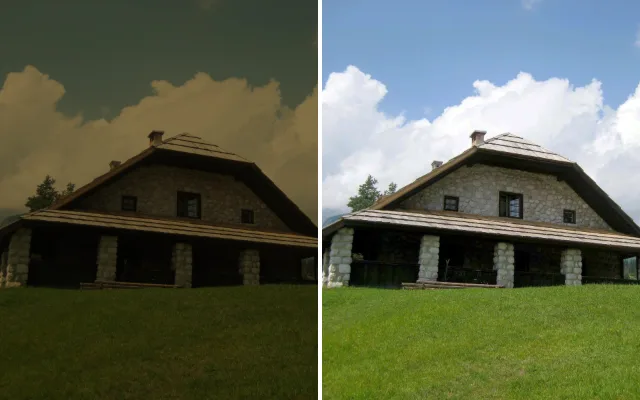 BeforeAfter
Limits and tips
- Up to 50 photos are used; extra photos are left out and the tool says so.
- The same settings are used for all photos; auto exposure brightens each photo according to its own light.
- The downloaded photo keeps its original size. Only photos over 40 million pixels are made smaller, and the tool tells you.
- The output is a JPEG. Quality options: "Highest (large file)", "High", "Medium (small file)".
- Dark photos get brighter, dull photos get livelier, a yellow or blue cast is balanced, and shadows are lifted.
- It cannot fully fix a blurry or very noisy photo.
- No AI is used; light and color are corrected by calculation.
Privacy
Your photos are never uploaded; the fix happens inside your browser. Everything is gone when you close the page.
Frequently asked questions
Is it free? Do I need an account?
It is free and there is no account. We add no logo or watermark to your photo.
Are my photos uploaded anywhere?
No. The fix happens inside your browser, on your own computer or phone. Everything is gone when you close the page.
Does the photo get smaller?
No, the downloaded photo keeps its original size. Only photos too large for the browser to open (over 40 million pixels) are made smaller, and the page tells you when that happens.
What does it fix?
Dark photos get brighter, dull photos get livelier, a yellow or blue cast is balanced, and shadows are lifted. It cannot fully fix a blurry or very noisy photo.
Can I fix many photos at once?
Yes, up to 50 photos. Choose your photos, check the settings on one, and press "Download all as ZIP". The same settings are used for all, and each photo is brightened according to its own light.
How do I brighten a dark photo?
Choose the photo; with "Auto exposure" ticked it is brightened by itself. If that is not enough, raise "Brightness" and "Lift shadows".
Do I need to install anything?
No. The tool runs in your browser; there is nothing to install and no account.
Does it fix a yellow color cast?
Yes. "White balance" corrects a yellow or blue cast.
Can I download a PNG?
No. The tool gives a JPEG; you pick the quality from three options.
Does it use AI?
No. The light and color of the photo are measured, and tone and color are corrected from that.
Related tools
- Day to dusk photo — give an exterior photo a sunset look.
- Remove objects from photos — remove clutter or a blemish.
- Real estate listing video — a listing video from your corrected photos.
- Guide: How to brighten a dark photo
Last updated: