Day to dusk photo editor
The sky in your daytime house or building photo is replaced with a sunset sky and the building gets evening light. Click the windows to make them look lit from inside. It is a free way to make a virtual twilight photo for a listing. Your photo is never uploaded.
To light a window, click on its glass in the preview.
downloadHow to use it
- Choose a daytime exterior photo under "Photo". The sky must touch the top edge of the photo.
- Pick the look under "Sky": "Orange sunset", "Pink evening" or "Blue hour (just after sunset)".
- Set how dark it gets with "Evening darkness". If the sky is detected wrongly, tick "Show the detected sky in color" and move the "Sky detection" slider.
- Click the glass of a window in the preview to light it. "Window light" sets the brightness.
- Compare with the before/after line, then press "Download photo (JPEG)".
What it is for
For giving an exterior listing photo an evening look. Instead of going back at sunset for a second shoot, you get a similar look from the daytime photo. It does not replace a real dusk shoot; if you use it in a listing, say that the photo has been edited.
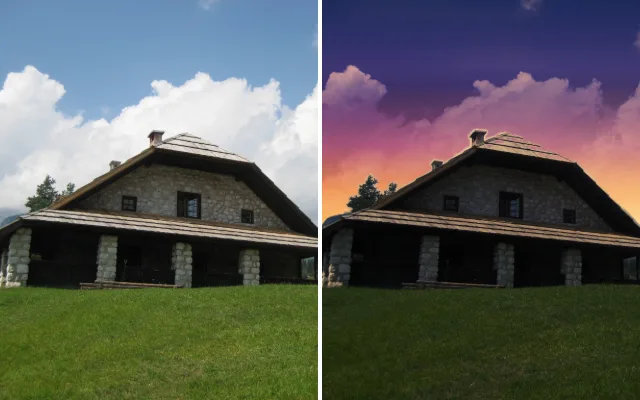 BeforeAfter
Limits and tips
- Best results: an outdoor photo of a building where the sky is clear blue or plain white and touches the top edge.
- If the sky is very close to the color of the building, or thick tree branches are in front of it, the edges may not be perfect.
- If no sky is found, the tool says so and suggests raising "Sky detection".
- Click the glass of a single window; if the area is too large, the tool says "That area is too large for a window".
- With "Also light other windows of the same color" ticked, similar windows light up too.
- The download is a JPEG at the original size (quality 0.92). Only photos over 40 million pixels are made smaller, and the tool tells you.
- One photo is processed at a time.
- There is no AI model; the tool's own code finds the sky and nothing is downloaded.
Privacy
Your photo is never uploaded; the change happens inside your browser. Everything is gone when you close the page.
Frequently asked questions
Is it free? Do I need an account?
It is free and there is no account. We add no logo or text to your photo.
Is my photo uploaded anywhere?
No. The change happens inside your browser, on your own computer or phone. Everything is gone when you close the page.
Which photos work best?
Outdoor photos of a building where the sky is clear blue or plain white and touches the top edge of the photo. If the sky is very close to the color of the building, or thick tree branches are in front of it, the edges may not be perfect; check with "Show the detected sky in color" and move the "Sky detection" slider.
Will it look like a real dusk photo?
It gives a similar look but does not replace a real dusk shoot. If you use it in a listing, we suggest you say the photo has been edited.
Does the photo get smaller?
No, the downloaded photo keeps its original size. Only photos too large for the browser to open (over 40 million pixels) are made smaller, and the page tells you when that happens.
What is a day to dusk (virtual twilight) photo?
A daytime exterior photo edited to look as if it was taken at dusk: a sunset sky, evening light on the building and lit windows. This tool makes that edit in your browser.
Can it turn a day photo into a night photo?
It gives an evening or dusk look; there is no full night (dark, starry sky) option. For the darkest look, pick "Blue hour" and raise "Evening darkness".
It says no sky was found. What should I do?
The sky must touch the top edge of the photo. Raise the "Sky detection" slider and check the result with "Show the detected sky in color".
How do I light up the windows?
Click the glass of a window in the preview. Click another window to add more; "Remove window lights" clears them all.
Does it work on interior photos?
The tool is for exterior photos. If the sky does not touch the top edge, no sky is found.
Does it use AI?
No. The sky is found from color, brightness and flatness. The new sky is drawn by the tool's own code and keeps the shape of the clouds in the original sky.
Related tools
- Brighten photos and fix color — brighten interior photos.
- Remove objects from photos — remove a cable or a sign from the facade.
- Real estate listing video — a listing video from your photos.
- Guide: Turning a daytime photo into dusk: how, and how far
Last updated: