What to write in a property listing description and title
Which details go into a home listing, in what order, and what fits in the title. Shown with real text written by the tool.
Open the tool: Listing description writer
A property listing has two parts: the title and the description. A good listing does not have to be long. It has to give the right facts in the right order. This guide shows what to put in the description and how to build the title, using real output from the listing description writer.
Which details, in what order?
The tool starts the text with "what is it, and where?", then moves to the building, then to the inside. The order is below, and you can follow the same order when you write by hand:
- Type and location: for sale or for rent, apartment or land, how many m², how many rooms, which neighborhood.
- Building: building age, floor, type of heating.
- Features: shared things such as a gated complex, parking or an elevator (the tool calls it "Lift"); things inside such as a balcony or an en-suite bathroom; the area around it, such as being near the metro or schools.
- Your own note: service charge, title deed status, price, or the date it becomes free.
- A contact line: an invitation to book a viewing or send a message.
The tool has no price field. If you type the price, a service charge or anything else into the "Anything to add" box, it is added to the text exactly as you typed it. To get a text, you must enter at least one of these: location, area (m²) or number of rooms. If you enter none, the tool says "Enter at least the location, the area (m²) or the number of rooms."
You choose the type from Apartment, Detached house, Land and Commercial. Fields and features that do not fit the type you chose are hidden. For land, for example, the tool does not ask for rooms, floor or building age, and the options "Zoned for building", "Road frontage" and "Electricity and water" appear only for land.
Write only what is true
The tool follows one rule: a detail you did not enter, or a feature you did not tick, is never written. It also adds no filler words such as "spacious" or "well-kept". That is a good test for text you write yourself, too. Instead of "spacious", write "125 m², 3 bedrooms". Instead of "fairly new", write the building age. A number says what an adjective cannot.
Example: one home, three tones
These made-up details were entered on the tool's English page:
- For sale, apartment, 3 + 1, 125 m², 4th floor, building age 12, gas combi boiler
- Oakdale / Riverside / Maple Grove
- Features: In a gated complex, Parking, Balcony, En-suite bathroom, Near the metro
- Anything to add: "Service charge 1,200 a month. Title deed ready."
There are three tones: Formal, Friendly and Short. Formal is selected by default.
In the Formal tone the tool wrote:
A 125 m², 3-bedroom apartment for sale in Maple Grove, Riverside, Oakdale. The apartment is on the 4th floor of a 12-year-old building. Heating is provided by a gas combi boiler. The apartment has a balcony and an en-suite bathroom. The property is part of a gated complex. The complex offers parking. It is close to the metro. Service charge 1,200 a month. Title deed ready. Contact us for details and a viewing.
In the Friendly tone, with the same details:
A 125 m², 3-bedroom apartment for sale in Maple Grove, Riverside, Oakdale! It is on the 4th floor of a 12-year-old building. It is heated by a gas combi boiler. It has a balcony and an en-suite bathroom. It sits in a gated complex. There is parking. It is close to the metro. Service charge 1,200 a month. Title deed ready. Want to see it? Send us a message and we will set up a viewing.
In the Short tone, the features go on one line:
Maple Grove, Riverside, Oakdale: 125 m², 3-bedroom apartment for sale. 12-year-old building, 4th floor, gas combi boiler. En-suite bathroom, near the metro, parking, gated complex, balcony. Service charge 1,200 a month. Title deed ready. Call to view.
In the tool these texts come split into paragraphs; here they are run together to save space. None of the three adds a single detail that was not entered. The "Rewrite" button picks other sentences from the same details and changes the order of the features. You can edit the result in the boxes.
The Formal tone ends its sentences with patterns such as "is offered" and "Heating is provided by". The Friendly tone uses exclamation marks and everyday patterns such as "It has" and "There is". The Short tone lists the features on one line without building sentences.
What happens with very few details?
With only "For sale, apartment, 2 + 1" entered, the tool wrote: "A 2-bedroom apartment for sale. Viewings are available by appointment." It does not fill the gap with filler. If the text is too short, the fix is to enter more: location, area, floor and features.
How to build a listing title
A title should say: for sale or for rent, what kind of place, how many bedrooms, and where. If there is room, add the area or one standout feature.
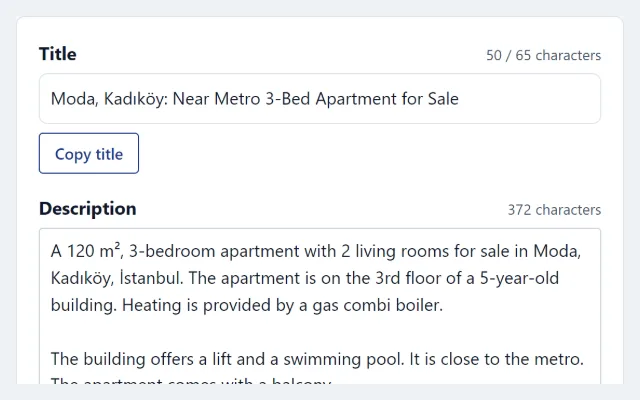
The tool builds the title from these parts. For the location it uses the neighborhood and the district; if both are empty, it uses the city. For the standout feature it picks one of the ones you ticked: Gated Complex, Sea View, Near Metro, Furnished, with Pool, Zoned, or Brand-New when the building age is 0. The title is kept to 65 characters at most. The character count is shown next to the title box.
Real titles written by the tool (all details are made up):
| Title | Characters |
|---|---|
| 125 m² 3-Bed Apartment for Sale in Maple Grove, Riverside | 57 |
| Maple Grove, Riverside: Gated Complex 3-Bed Apartment for Sale | 62 |
| 3-Bed Apartment for Sale in Maple Grove, Riverside | 50 |
| 1-Bed Apartment for Rent in Hillside | 36 |
| 500 m² Land for Sale in Stonebridge | 35 |
Two rules that help when you write a title:
- The tool puts at most one standout feature in a title. One feature is enough in your own title too.
- Check that whatever the title promises is also in the description.
The listing site's title limit may differ from 65 characters. If needed, shorten the title in the tool's box.
The social media post
The tool also writes a social media post of up to 280 characters. If it does not fit, it drops features first. Listing type and location hashtags go at the end. In the example above they were "#ApartmentForSale #Oakdale #Riverside #MapleGrove #RealEstate".
Copying the text
The title, the description and the social media post each sit in their own box, and each box has its own copy button: "Copy title", "Copy description" and "Copy social media post". If copying fails, the tool says "Could not copy. Select the text and copy it yourself."
When the tool is not enough
- Listings that are not property: the tool only writes for apartments, detached houses, land and commercial property.
- A feature that is not on the list: type details such as the direction of the view, recent repairs or the state of the furniture into "Anything to add" yourself.
- Whether the facts are right: the tool writes what you enter; it cannot know if it is true. Read the text before you post it.
Your details are never sent anywhere; the text is made inside your browser. Once the text is ready, you can make a listing video from photos, draw a floor plan, or brighten dark photos with the photo light fix tool. To write your text, open the listing description writer.
Open the tool: Listing description writer
More guides
Last updated: