What is a subnet mask, and what does /24 mean?
Which part of an IP address names the network and which part names the device. With examples and a /8 to /30 table calculated by the tool.
In router settings, when you set up a printer or in a network document, you see things like "255.255.255.0" or "/24". Both say the same thing: the subnet mask. This guide explains what the mask is, what /24 means and how many addresses a network has, using real results from the subnet calculator in the IP lookup tool.
An IP address has two parts
An IPv4 address such as 192.168.1.20 is four numbers separated by dots. Each number is between 0 and 255. A computer stores each number as 8 bits (eight 0s or 1s), so the whole address is 32 bits.
Part of those 32 bits names the network, and the rest names the device on that network. It is like a street address: houses on the same street share the street name, and the house number tells them apart. The subnet mask tells you how much of the address is the "street name".
What does /24 mean?
"/24" means the first 24 bits of the address name the network. This is called the prefix length. The first 24 bits are the first three numbers. So in 192.168.1.20/24, "192.168.1" is the network and the last number, "20", is the device.
The same thing written as a mask is 255.255.255.0. 255 is the number where all eight bits are 1, and the bits that are 1 mark the network part. Three 255s make 24 bits.
The last number can take 256 values, from 0 to 255. So a /24 network has 256 addresses. Two of them are not given to devices:
- The network address (the first one, 192.168.1.0 in the example) is the name of the network itself.
- The broadcast address (the last one, 192.168.1.255 in the example) is for messages sent to everyone on the network at once.
That leaves 254 usable addresses: from 192.168.1.1 to 192.168.1.254.
Example: 192.168.1.20/24
When we typed this address into the subnet calculator, the tool first said: "The address you typed is not the start of the network. The network address is 192.168.1.0." In other words, it worked out the network that device number 20 is on. It then showed:
| Row | Result |
|---|---|
| Network address | 192.168.1.0/24 |
| Subnet mask | 255.255.255.0 |
| Wildcard mask | 0.0.0.255 |
| Broadcast address | 192.168.1.255 |
| First usable | 192.168.1.1 |
| Last usable | 192.168.1.254 |
| Number of addresses | 256 |
| Usable addresses | 254 |
| Range type | Private network (home, office) |
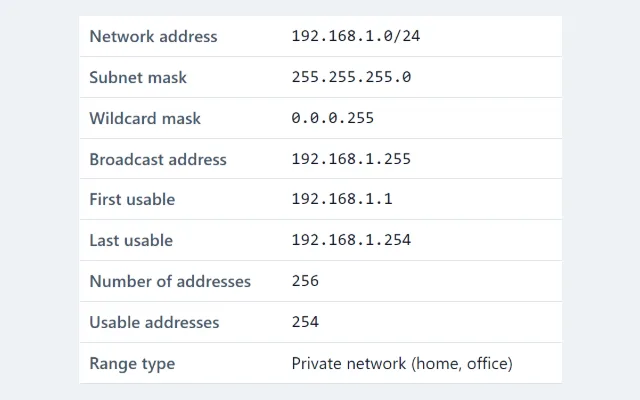
The "wildcard mask" (0.0.0.255) is the mask turned inside out: the 1s in the mask become 0s and the 0s become 1s. The "Range type" row says that addresses starting with 192.168 are a "Private network (home, office)". As the tool's page says, these addresses are not visible on the internet and do not belong to a country.
Using the tool
In the "Subnet calculator" part of the page, type a network into the "Network" box and press "Calculate" (Enter works too). Three forms are accepted: an address with a prefix (192.168.1.0/24), an address and a mask (10.0.0.5 255.255.255.252) and an IPv6 network (2001:db8::/48). If you leave out the prefix length, the tool says "Add the prefix length, e.g. 192.168.1.0/24." If the network or the mask is not valid, it says "Not a valid network."
Splitting a network: a /26 example
The larger the prefix, the smaller the network. Each step up halves the number of addresses. The 256 addresses of a /24 split into four blocks of 64 with /26: the blocks starting at .0, .64, .128 and .192.
For 192.168.1.64/26 the tool gave: mask 255.255.255.192, broadcast address 192.168.1.127, first usable 192.168.1.65, last usable 192.168.1.126, 64 addresses, 62 usable.
You can also type a mask instead of a prefix. When we typed "10.0.0.5 255.255.255.252", the tool read it as 10.0.0.4/30: 4 addresses, 2 usable (10.0.0.5 and 10.0.0.6). Two usable addresses are enough to link two devices.
Table from /8 to /30
The values below were calculated with the tool: for each prefix, the network 10.0.0.0 was typed in and the result was copied from its table.
| Prefix | Subnet mask | Addresses | Usable |
|---|---|---|---|
| /8 | 255.0.0.0 | 16,777,216 | 16,777,214 |
| /9 | 255.128.0.0 | 8,388,608 | 8,388,606 |
| /10 | 255.192.0.0 | 4,194,304 | 4,194,302 |
| /11 | 255.224.0.0 | 2,097,152 | 2,097,150 |
| /12 | 255.240.0.0 | 1,048,576 | 1,048,574 |
| /13 | 255.248.0.0 | 524,288 | 524,286 |
| /14 | 255.252.0.0 | 262,144 | 262,142 |
| /15 | 255.254.0.0 | 131,072 | 131,070 |
| /16 | 255.255.0.0 | 65,536 | 65,534 |
| /17 | 255.255.128.0 | 32,768 | 32,766 |
| /18 | 255.255.192.0 | 16,384 | 16,382 |
| /19 | 255.255.224.0 | 8,192 | 8,190 |
| /20 | 255.255.240.0 | 4,096 | 4,094 |
| /21 | 255.255.248.0 | 2,048 | 2,046 |
| /22 | 255.255.252.0 | 1,024 | 1,022 |
| /23 | 255.255.254.0 | 512 | 510 |
| /24 | 255.255.255.0 | 256 | 254 |
| /25 | 255.255.255.128 | 128 | 126 |
| /26 | 255.255.255.192 | 64 | 62 |
| /27 | 255.255.255.224 | 32 | 30 |
| /28 | 255.255.255.240 | 16 | 14 |
| /29 | 255.255.255.248 | 8 | 6 |
| /30 | 255.255.255.252 | 4 | 2 |
The rule is easy to remember: the number of addresses is 2 to the power of (32 − prefix). For /24 that is 2⁸ = 256; for /16 it is 2¹⁶ = 65,536. The usable count is 2 less, for the network and broadcast addresses.
For /31 and /32 the tool shows no broadcast address and counts every address as usable: 2 for /31 and 1 for /32. For 10.0.0.0/31, for example, the first usable address is 10.0.0.0 and the last usable address is 10.0.0.1.
What this means on a home network
Home and office networks use private addresses: those starting with 10, those from 172.16 to 172.31, and those starting with 192.168. The tool recognizes these ranges and marks them "Private network (home, office)" in the "Range type" row. If you give a device an address by hand, check that it is inside the network, that it is not the network or broadcast address, and that no other device already uses it.
You can also calculate IPv6 networks (for example 2001:db8::/48). For IPv6 the tool shows the network address, the prefix length, the range and the number of addresses; there is no broadcast row. For 2001:db8::/48 the range was "2001:db8:: – 2001:db8:0:ffff:ffff:ffff:ffff:ffff", the number of addresses was "2^80 (1,208,925,819,614,629,174,706,176)" and the range type was "Example address for documents".
The other half of the tool
In the upper part of the same page you can look up which country an address belongs to. Type one address per line in the "IP addresses" box (up to 200); the "Look up" button gives the result, and "Sample addresses" fills in a sample list. Only the country is shown, not the city. The country data is the free Lite edition from DB-IP, and the date of the data is shown on the page. The tool does not show your own IP address. For subnet math, open the IP lookup tool.
More guides
Last updated: