IP lookup
Type an IP address and see which country it belongs to. The tool shows the country only, not the city or street. The address you type is not sent to another site; the country is read from a data file on this site.
| Address | Country | Notes |
|---|
Country data: IP Geolocation by DB-IP · license CC BY 4.0 · data date: November 2026
Subnet calculator
How to use it
- Type one address per line in "IP addresses" (up to 200). To try it, press "Sample addresses".
- Press "Look up".
- In the table, check the "Country" and "Notes" columns for each address. Local network and special-purpose addresses are marked.
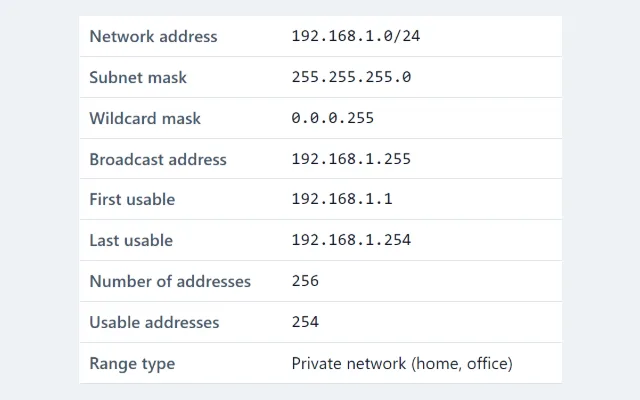
- For a subnet, type a network such as 192.168.1.0/24 in the "Network" box under "Subnet calculator" and press "Calculate".
What it is for
For anyone who sees an IP address in a server log, an email header or a security alert and wants to know which country it is from. Network admins and students use the subnet calculator. It suits you if you do not want to hand the address you are checking to an outside service.
Limits and tips
- Only the country is shown, not the city, street or person.
- It does not show your own IP address. To do that, the page would have to ask an outside service about you, and it does not.
- Up to 200 addresses per lookup; extra lines are not looked up and the tool says so.
- Both IPv4 and IPv6 addresses are looked up.
- The data is the free Lite edition from DB-IP (CC BY 4.0), which is less detailed than the paid edition. The date of the data is shown under the box.
- Someone using a VPN or proxy will show the country of that service.
- Addresses such as 10.x, 172.16–31.x and 192.168.x are local network addresses and do not belong to a country. The tool recognizes these and other special-purpose ranges.
- For IPv4, the subnet calculator shows the network address, subnet mask, wildcard mask, broadcast address, first and last usable address and the number of addresses. For IPv6 it shows the prefix length, the range and the number of addresses.
- You can also write the network with a mask: "10.0.0.5 255.255.255.252".
Privacy
The address you type is not sent to another site; the country is found inside your browser. To do that, only the small data file for the first part of the address is downloaded from this site. This site can see which file was requested, which reveals only the first part of the address.
Frequently asked questions
Is it free? Do I need an account?
It is free and there is no account.
Is the address I type sent anywhere?
No. The country is found inside your browser. To do that, only the small data file for the first part of the address is downloaded from this site. This site can see which file was requested, which reveals only the first part of the address. No request goes to any other site.
Does it show my own IP address?
No. To find your own address the page would have to ask an outside service about you, and we do not do that. You can see your internet address on your router's admin page.
What does "This is a local network address" mean?
Addresses such as 10.x, 172.16–31.x and 192.168.x are used inside home and office networks. They are not visible on the internet and do not belong to a country. Addresses starting with 100.64 are used by internet providers inside their own network. 127.x and ::1 mean the computer itself.
How accurate is the result?
Only the country is shown, not the city. The data is the free Lite edition from DB-IP, which is less detailed than the paid edition. Someone using a VPN or proxy will show the country of that service.
How often is the data updated?
DB-IP refreshes the free data once a month. The date of the data used on this page is shown under the box.
What does the subnet calculator do?
Type a network such as 192.168.1.0/24 to see the network address, broadcast address, first and last usable address, the mask and the number of addresses. It also works with IPv6 networks.
How do I find out what country an IP address is from?
Type the address in the box and press "Look up". The country is shown next to the address.
Can it show the city or exact location of an IP address?
No. Only the country is shown, not the city, street or map location.
Does it show who owns an IP address?
No. The data holds the country only; it has no owner or subscriber details.
How do I calculate a subnet from CIDR?
Type a network such as 192.168.1.0/24 in "Network" and press "Calculate". You get the network address, mask, broadcast address, first and last usable address and the number of addresses.
How many addresses are in a /24?
256 addresses, of which 254 are usable. The tool shows these numbers for any network.
Does the subnet calculator work with IPv6?
Yes. For an IPv6 network such as 2001:db8::/48 it shows the prefix length, the range and the number of addresses.
Related tools
- Chart maker — put your results in a table and draw a chart.
- Guide: What is a subnet mask, and what does /24 mean?
Last updated: