Free CV maker — no sign-up
Type your details, pick a template and download your CV or resume as a PDF. There is no account and no payment. The CV is made in your own browser; your data is never uploaded.
Personal details
Work experience
Education
Skills and languages
Download
If you save, your details come back when you open the page again. Do not tick this on a shared computer.
How to use it
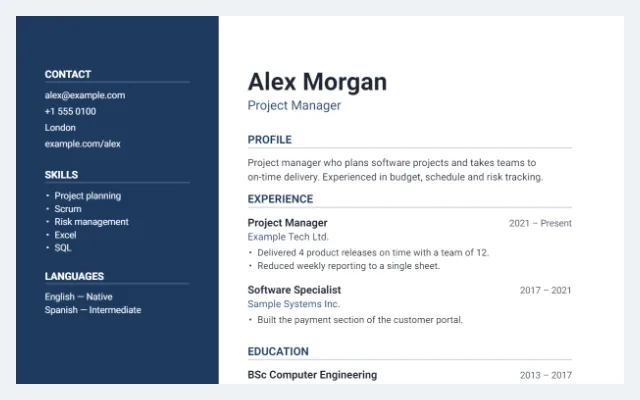
- Pick a "Template": "Classic", "Modern (colored side column)" or "Plain". To see how it looks, press "Use sample details".
- Fill in "Personal details": Full name, Job title, Email, Phone, City, Link. Optionally add a "Photo" and a "Short summary".
- Add your jobs and schools with "+ Add experience" and "+ Add education". In "What did you do?", each line becomes a bullet point.
- Type your "Skills" separated by commas and your "Languages" one per line.
- Check the preview on the side and press "Download PDF".
What it is for
For anyone who needs a clean CV or resume quickly for a job application: students, graduates and job changers. You do not need Word or design software; the CV appears beside the form as you type. You pick one of three templates and the tool lays out the page.
Limits and tips
- The output is an A4 PDF; there is no Word (docx) file.
- The text in the PDF is real text, not a picture: it can be selected and copied, so applicant tracking systems can read it. Accented letters come out correctly.
- If your details do not fit on one page, the tool adds a page. Past two pages, it shows the note "A CV is usually 1–2 pages."
- A photo is optional. If you add one, it is cropped from the center to a 3:4 passport-photo ratio.
- The address you type in "Link" is clickable in the PDF.
- In the experience text, a line starting with "-", "•" or "*" also becomes a bullet point.
- If you tick "Save my details in this browser", your details stay only in this browser and come back when you open the page again. Do not tick it on a shared computer. "Clear the form" also deletes the saved copy.
- The page size is A4 only; there is no US Letter option.
- There is no AI; the tool does not write text, it lays out what you type.
Privacy
Your details and photo are never uploaded; the CV is made inside your browser. If you do not tick the save box, your details are gone when you close the page. If you tick it, they are kept only in this browser.
Frequently asked questions
Is it free? Do I need an account?
It is free and there is no account. No watermark is added to the PDF.
Is my data uploaded anywhere?
No. The CV is made inside your browser. If you tick "Save my details in this browser", your details stay only in this browser; "Clear the form" deletes them.
Can applicant tracking systems read my CV?
Yes. The text in the PDF is real text, not a picture; it can be selected and copied. Accented letters come out correctly.
Do I have to add a photo?
No. If you add one, it is cropped from the centre to passport shape (3:4).
Is this a CV maker or a resume builder?
Both words describe the same thing here: a one- or two-page document with your experience, education and skills, as an A4 PDF.
Can I download my resume as a Word file?
No. The tool gives a PDF only.
Is the page US Letter or A4?
A4 only.
Does AI write my CV?
No. The tool does not generate text; it places what you type into the template you pick.
How many templates are there?
Three: Classic, Modern (colored side column) and Plain. You can switch at any time without losing what you typed.
Related tools
- White background for product photos — remove the background of a photo (fine hair can get soft edges on portraits).
- Brighten photos and fix color — brighten a dark CV photo.
- Chart maker — a chart from a table for a portfolio or presentation.
- Guide: How to write a CV as a student or recent graduate
Last updated: